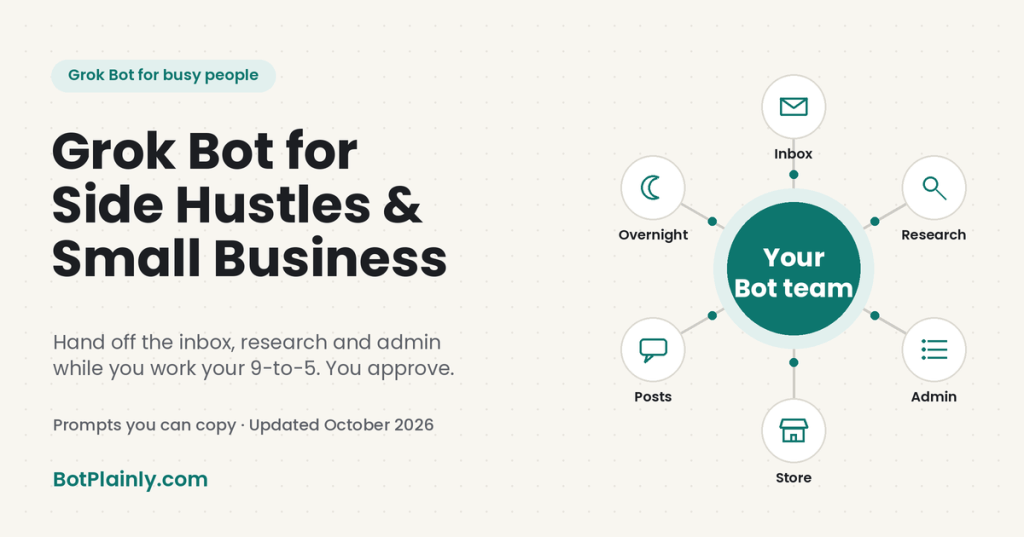
Short answer: Grok Bot is an AI agent for small business owners, solopreneurs, and side hustlers that does the work, not just the talking. It can sort your business inbox, research your idea, gather receipts, draft posts and replies, and keep a small online store tidy, even while you’re at your day job. You stay in charge of anything that gets sent, paid, or signed.
Last checked: October 21, 2026. Prices and features change, so see the official links at the end.
Why I wanted to write this one
I run several Bots, and one of them builds and runs this blog as a side project. That’s the part of Grok Bot I wanted to share here. For years I wanted to get my email under control, and inbox cleanup was one of the first jobs I handed off. Now my projects keep moving in the background, with help around the clock when I need it, and I can brainstorm an idea and start on it right away instead of saving it for “someday.” As a busy mom of two, handing the work part of my day to a few assistants means more of my focus goes to my kids and my family.
If you work a 9-to-5 and have a business idea (or a small business that’s already running), you know the problem. The idea isn’t the hard part. The hard part is the pile of small jobs around it: answering messages, researching, tracking receipts, posting, following up. Most of it happens in the scraps of time left after work. Below are ideas you can hand off, grouped by area, with prompts you can copy and paste.
What makes an AI agent different for a small business
A regular AI chat app, like Grok or ChatGPT, is great for writing and answering questions. You still do the clicking, copying, and sending. An AI agent is closer to a helper you hand a job to.
With Grok Bot, each Bot works on a cloud computer with a browser, files, and a terminal, so it can use websites and connected apps and keep working while your laptop is closed. You can create more than one Bot, give each one a job, and put a few in the same chat so they pass work between them. The official site describes them as “AI teammates” that work in parallel and keep working 24/7.
SpaceXSI, the company behind Grok, put the idea this way in a recent post about its own support team: “Give Bots jobs, not tasks.” That’s a good rule for a side hustle too. Instead of asking for help one task at a time, give a Bot an ongoing job, like “keep my business inbox sorted.”
If you’re still deciding between AI assistants, our Grok vs ChatGPT comparison walks through the differences.
A simple starter team for a side hustle
Start with one Bot, then add more once the first one earns your trust. Here’s one way to split the work:
- Inbox Bot: business email, customer questions, and replies drafted for your review.
- Research Bot: your idea, your market, competitor prices, and the rules you need to follow.
- Admin Bot: receipts, expenses, appointments, and the paperwork pile.
- Marketing Bot: post ideas, drafts, and keeping an eye on what people are saying.
These names are just examples. You name your Bots and describe their jobs in plain words. If you’re also running a household, our guide to Grok Bot for busy moms has a starter team for home and family.
1. Your business inbox and customer messages
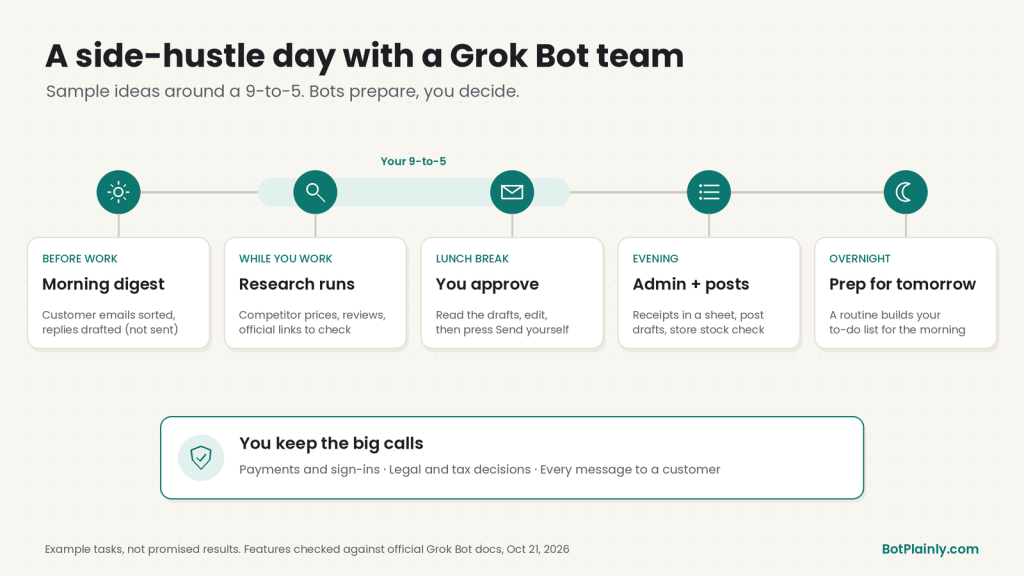
For many side hustles, email is the business. If you connect Gmail, a Bot can search and read mail, draft replies, and apply labels. With a routine (a job a Bot repeats on a schedule you set), it can do that every morning before work.
Copy-paste prompts:
“Every weekday at 7 AM, check my business Gmail for new customer emails. Sort them into: needs a reply today, can wait, and spam or sales pitches. Draft short, friendly replies for the first group in my voice. Don’t send anything.”
“Find every customer email from the last 30 days that never got a reply. Make a list with the date, the customer’s name, and what they asked.”
Good to know: Gmail connects one mailbox at a time. If your business mail and personal mail are in different Gmail accounts, connect the one the Bot should work in.
Grok Bot can also have its own email address that ends in @mail.grokbot.com. A Bot can use it to sign up for services, collect receipts and newsletters, and contact businesses for you. You can set a routine to run when mail arrives from a certain address or a whole domain, like your supplier’s. Every email it writes waits as a draft until you press Send, even from a routine. You get one address per account, and you can’t rename or delete it, so pick the name carefully.
2. Research and planning for your idea
Before you spend money, you want answers. This is the kind of “lots of open tabs” work a Bot can take on while you’re at your day job.
Copy-paste prompts:
“I’m thinking about selling [product] online. Research five businesses already selling something similar. Make a table with their prices, what customers praise, and what customers complain about in reviews. Include links.”
“I want to start a [type of business] in [state] as a side business. Make a step-by-step checklist of what I’d need to look into, like registration, permits, and sales tax. Link the official government page for each step, and mark anything I should confirm with a professional.”
That second prompt is a starting point for your own research, not legal or tax advice. More on that below.
3. Admin, receipts, and scheduling
The admin is where side hustles quietly stall. The official Grok Bot use cases include an “Expense Manager” Bot that builds a weekly expense summary, matches receipts, and drafts follow-ups without sending them or changing anything.
Copy-paste prompts:
“Every Friday at 6 PM, look through my business email for receipts and invoices from this week. Add them to a simple spreadsheet with the date, vendor, amount, and category. Flag anything that looks like a subscription. Don’t pay or cancel anything.”
“Check my Google Calendar for open time next week after 6 PM and on Saturday morning. Suggest three times I could offer a client for a 30-minute call, and draft the email for me to approve.”
If you connect Google Calendar, a Bot can check free time and create or update events. If you connect Google Sheets, it can edit sheets your account can edit.
4. Marketing and social posts
Posting regularly is hard when you only have evenings. A Bot can do the prep so you only review and post.
Copy-paste prompts:
“Give me 10 post ideas for my [business] for the next two weeks. For each one, write a short draft and suggest a photo I could take. Put them in a simple table. Don’t post anything.”
“Every Monday, search X for recent posts asking questions about [your topic]. Show me the five best questions I could answer, with links, so I can reply myself.”
The official @bot account says Grok Bot can search, read, and monitor X. You can also tag @bot in a post on X to hand your main Bot a task. That needs your X account connected to Grok, tagged requests use your Grok Bot usage, and it isn’t available yet for accounts based in the UK, the EU, Australia, Iceland, Liechtenstein, or Norway.
5. Running a small online store
On October 8, 2026, the official @bot account announced that Grok Bot “can now help run your Shopify store”: connect Shopify, then ask it to check orders, track inventory, and keep product listings up to date.
Copy-paste prompts:
“Every morning, check my Shopify store for new orders and anything low in stock. Give me a short summary and a list of what I should reorder. Don’t change any listings or prices.”
“Read my product listings and suggest clearer titles and descriptions for the five that get the fewest sales. Show me the before and after. Don’t publish the changes.”
Not on Shopify? Bots can use many websites through their browser, even without a ready-made connector. Some sites block automation or log out, and then you’ll need to step in.
6. Work that runs while you’re at your 9-to-5
This is the real point for a side hustler. Routines run in the cloud while your laptop is closed. They can run on a schedule, or start when something happens, like an email arriving. And if you have a workflow you repeat, you can show a Bot how it’s done: walk through it once while the Bot watches, and it can save it and run it again later.
Copy-paste prompts:
“Every night at 11 PM, prepare tomorrow’s to-do list for my business: customer emails waiting on me, orders to ship, and posts to approve. Have it ready when I wake up.”
“Watch me update my price list once, then turn it into a routine you run every month. Show me the changes before you save them.”
One tip from the official advice: start with “read and prepare” jobs, check the results, and only then add actions or a schedule.
You stay in charge: what to keep a human on
The official Grok Bot docs say to keep “consequential external actions behind approval.” For a small business, here’s what that means in practice.
- Payments and money moves. For logins, two-factor codes, and payment steps, the Bot hands the computer to you instead of typing them itself. Keep it that way. Add a rule like “ask first before any purchase” under Settings → General → Auto-review, and end money-related prompts with “Don’t pay, buy, or cancel anything.”
- Legal and tax decisions. A Bot can gather official links and make checklists. Decisions about business structure, contracts, licenses, and taxes belong to you, ideally with a qualified professional.
- Messages to customers. Emails always wait as drafts, so read each one before you press Send. A polite but wrong answer to a customer costs more than a slow one.
- Changes to your store or ads. Ask for a “before and after” and approve changes yourself, even once a job becomes a routine.
- Facts that matter. Like any AI, a Bot can get things wrong. The docs suggest asking it to check the current source instead of relying on its memory for important decisions. Double-check prices, deadlines, and rules.
- The shared computer. All your Bots share one cloud computer, including its browser logins. If you sign in to a store or bank account there, every Bot can reach it, so give access only where a job needs it.
- Instructions hidden in emails or web pages. Grok Bot treats email from other people as information, not instructions, and a request inside an email never counts as your permission to send. The docs still say these safeguards reduce the risk from malicious content but don’t remove it. That’s one more reason to keep approvals on.
Honest limits before you start
- It’s not a money machine. Grok Bot can take work off your plate. It can’t promise your idea will make money, and neither can we.
- It isn’t free. Grok Bot comes with the Premium plan and above (below). There’s a free trial, but it’s a usage credit, not a free plan.
- Usage can run out. Each paid plan has a weekly usage allowance shared across Grok and Grok Bot. The official help pages warn that an hourly routine can use a week of usage in a day, so daily or weekly schedules are a better fit for most side hustles.
- Some websites push back. A site can block automation, end a session, or need a human step, and the Bot hands those steps to you.
Which plan includes Grok Bot (and what it costs)
Grok Bot doesn’t have its own subscription. It comes with the larger plans of The X Subscription, which bundles Grok, Grok Bot, Cursor, and X Premium perks. For the full breakdown, see our Grok Bot pricing guide.
| Plan | Price (US, before tax) | Includes Grok Bot? |
|---|---|---|
| Free | $0 | No |
| Plus | $8/month or $80/year | No |
| Premium | $30/month or $300/year | Yes |
| Super | $100/month or $1,000/year | Yes, with more usage |
| Ultra | $200/month or $2,000/year | Yes, with the most usage |
Prices last checked October 21, 2026, on x.ai/pricing and docs.x.ai/x-subscription/pricing. Prices can change, and tax may be added at checkout.
For most side hustlers trying it for the first time, Premium is the cheapest plan that includes Grok Bot, and it’s the plan the official pricing page recommends for new AI users. The same page recommends Super for “daily agent users.” Plus does not include Grok Bot, which is a common mix-up.
If you have a team: team plans offer Premium at $30, Super at $100, and Ultra at $200 per seat, and you can mix seat types, for example three Premium seats and one Super seat. Plus isn’t available for teams.
About the free trial: the Grok Bot trial is a usage credit with a 7-day window. A big job can use most of it at once, and the trial never turns into a paid plan on its own. A trial started through the Apple App Store is different: Apple runs it, and it becomes a paid subscription unless you cancel first.
How to get started this week
- Pick a plan at x.ai/pricing (Premium or higher), then download the Grok Bot app from x.ai/bot. It runs on Mac, Windows, Linux, iPhone, iPad, and Android.
- Create one Bot with one job, like “Inbox Bot: my business email,” and connect only what that job needs.
- Give it one small “read and prepare” task, like the list of unanswered customer emails above.
- Check the result and correct it. When it’s right, ask the Bot to turn it into a routine, then add your next Bot.
You don’t need to automate your whole business in a weekend. The goal is to get a few evenings back each month and spend them on the part of your business only you can do.
Frequently asked questions
What is the best AI agent for a small business?
It depends on what you need. Grok Bot is one option built for doing tasks, not just chatting. Each Bot works on its own cloud computer, uses your connected apps and websites, runs routines on a schedule, and asks for approval before sending email. Compare a few tools against your real tasks and budget before you decide.
Can Grok Bot help with a side hustle while I work a full-time job?
Yes, that’s a good fit. Bots work on a cloud computer, so routines keep running while your laptop is closed. You can have a Bot prepare a morning summary, research during the day, and leave drafts for you to approve in the evening.
Will Grok Bot reply to my customers without asking me?
No. Every email a Bot writes waits as a draft until you press Send, including emails from routines. There’s no option for unattended sending. Instructions inside an email it receives never count as your permission to send.
Can Grok Bot do my taxes or handle legal paperwork?
Don’t rely on it for that. A Bot can gather receipts, organize expenses, and collect links to official pages, but tax, legal, and licensing decisions should stay with you and a qualified professional. Double-check anything important against the official source.
Does Grok Bot work with Shopify?
Yes. On October 8, 2026, the official @bot account announced that you can connect Shopify and ask Grok Bot to check orders, track inventory, and keep product listings up to date. It’s a good idea to ask it to show you changes before it makes them.
How much does Grok Bot cost for a small business?
Grok Bot is included with the Premium plan of The X Subscription ($30/month or $300/year in the US) and the higher Super and Ultra plans. Team seats are $30, $100, or $200 per person per month. The Free and Plus plans don’t include it. Prices last checked October 21, 2026.
Sources (last checked October 21, 2026)
- Grok Bot overview, shared computer, and FAQ: docs.x.ai/grok-bot/overview
- “AI teammates” and “Show a Bot how it’s done”: x.ai/bot
- Official use cases (Expense Manager, “read-and-prepare” first, approvals): docs.x.ai/grok-bot/use-cases
- Approvals, Auto-review rules, sign-ins and payments, prompt injection: docs.x.ai/grok-bot/security
- Connect apps (Gmail, Google Calendar, Google Sheets): cursor.com/help/grok-bot/connect-apps
- Bot email address and email routines: cursor.com/help/grok-bot/agent-email
- Routines and usage warning: cursor.com/help/grok-bot/routines
- Shared computer and logins: Grok Bot 101 guide
- “Give Bots jobs, not tasks”: Using Grok Bot to detect and respond to incidents (Oct 20, 2026)
- Shopify announcement: @bot on X, Oct 8, 2026
- Bot email announcement: @bot on X, Oct 9, 2026
- Search, read, and monitor X: @bot on X, Oct 7, 2026
- Tag @bot on X: docs.x.ai/grok-bot/tag-on-x
- Prices and team seats: x.ai/pricing and docs.x.ai/x-subscription/pricing
- Plans and trial details: cursor.com/help/grok-bot/plans
BotPlainly is an independent guide. We’re not affiliated with, endorsed by, or sponsored by SpaceXSI (formerly xAI), X, Cursor, or Shopify. Grok and Grok Bot are their trademarks. We don’t earn anything from these plans. Prices and features can change at any time, so always check the official pages before you buy.

