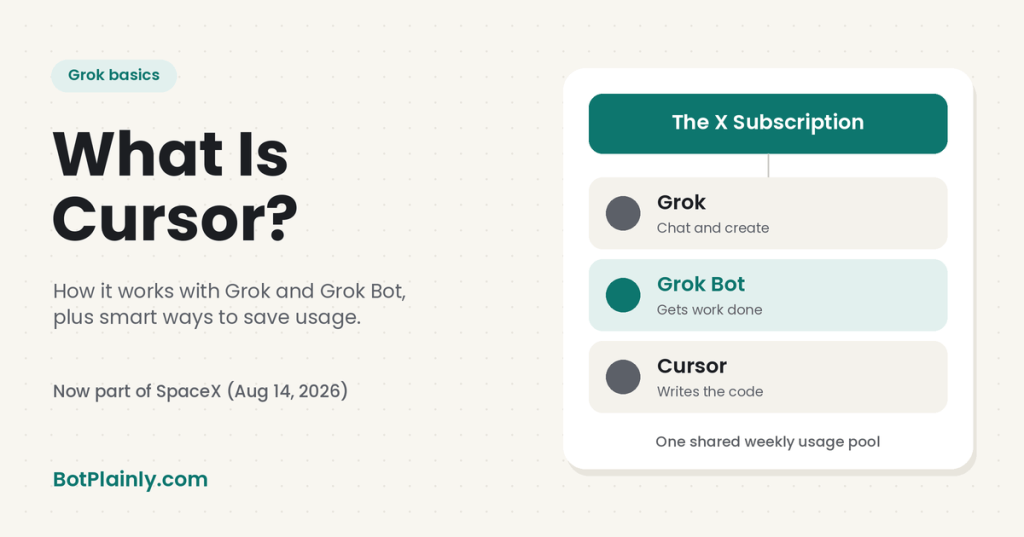
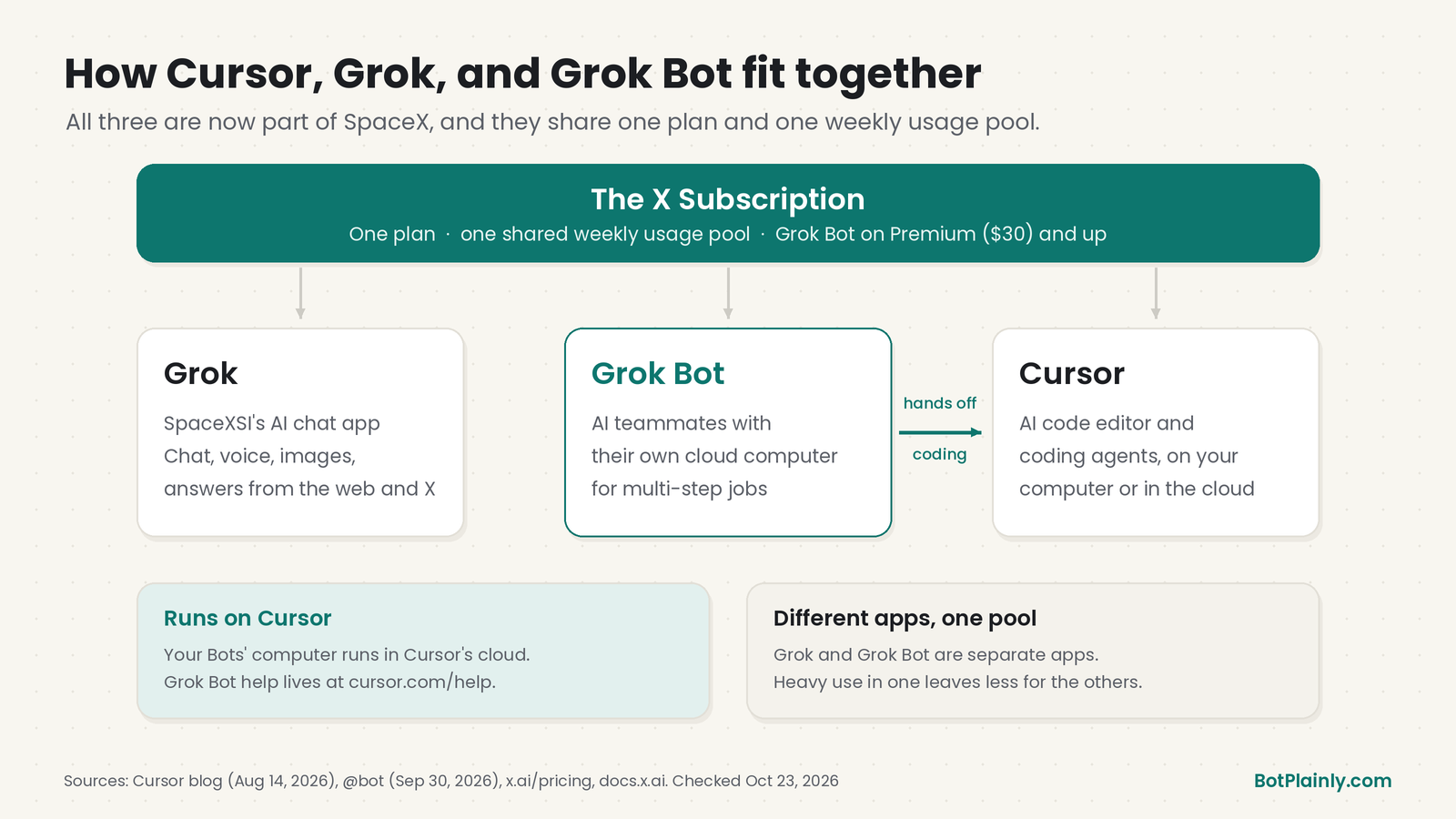
Short answer: Cursor is an AI coding tool. It’s an editor and a set of coding agents that read your code, plan changes, fix bugs, and open pull requests. Yes, SpaceX really did buy it: Cursor says the deal closed on August 14, 2026. Today Cursor sits in the same family as Grok and Grok Bot. All three come with The X Subscription and draw from one shared weekly usage pool. Grok Bot runs on Cursor’s cloud, and it can hand coding jobs to Cursor’s agents for you.
Last checked: October 23, 2026. These products change fast, so see the official links at the end.
Did SpaceX really buy Cursor?
Yes. This one isn’t a rumor. Here’s the timeline from the companies’ own posts:
| Date | What happened | Official source |
|---|---|---|
| Apr 21, 2026 | Cursor announced it was “partnering with SpaceX to improve Composer,” its own coding model | @cursor_ai on X |
| Jun 16, 2026 | SpaceX said it “has exercised the option to acquire @cursor_ai in an all-stock transaction” | @SpaceX on X |
| Aug 14, 2026 | Cursor posted: “Cursor is now part of @SpaceX. Today, we have officially closed our acquisition.” | @cursor_ai on X and Cursor’s blog |
Cursor’s blog post from that day, “Cursor is now a part of SpaceX,” says the deal “completes the acquisition process that started in April.” On X, Cursor added that its team would join SpaceX’s AI team “to help make Grok the world’s most useful AI and improve Grok Build, Grok Bot, Grok API, Cursor, and more.”
SpaceX’s filings with the U.S. Securities and Exchange Commission say the same thing: the merger closed on August 14, 2026, and Cursor (legal name Anysphere, Inc.) is now a wholly owned SpaceX subsidiary.
How does that connect to Grok? Grok is made by SpaceXSI, the company formerly called xAI. SpaceX announced it had acquired xAI on February 2, 2026 (see our guide to what Grok is). So Grok, Grok Bot, and Cursor are all now under SpaceX.
What is Cursor?
Cursor’s own docs call it “a coding agent for building ambitious software.” In plain English, it’s an AI helper for people who write code. You describe what you want, and it works inside your project to build it.
Here’s what it does, per Cursor’s docs:
- Understand your code. Ask how a project fits together and where to start.
- Plan and build features. It can map out a change before it writes any code.
- Find and fix bugs. It reproduces a problem, finds the cause, and checks the fix.
- Review changes. It inspects edits and runs checks before you merge.
It comes in a few forms:
- The Cursor editor: a desktop app where you write code with an AI agent beside you.
- Cloud agents: coding agents that run on their own computer in the cloud. You can run several at once, close your laptop, and come back to a finished pull request with screenshots or videos of the work. You can start them from the Cursor app, the web at cursor.com/agents, the iPhone app, Slack, GitHub, or Linear.
- The Cursor CLI: the same agents in a terminal window.
- Extras on bigger plans: x.ai/pricing lists code hosting through Origin and AI code reviews through Bugbot on Premium and up.
Do you need Cursor if you don’t code? Probably not. If you never touch code, you can skip the Cursor app entirely. Grok Bot still uses Cursor behind the scenes, as explained below.
Grok, Grok Build, Cursor, and Grok Bot: who does what
The names overlap a lot, so here’s the simple version:
| Product | What it is | Best for |
|---|---|---|
| Grok | SpaceXSI’s AI chat app at grok.com, in the phone apps, and inside X | Questions, writing, images, voice chats |
| Grok Build | SpaceXSI’s coding agent that runs in your computer’s terminal | Developers who like working in a terminal |
| Cursor | An AI code editor plus coding agents on your computer and in the cloud | Building and fixing software |
| Grok Bot | AI teammates with their own cloud computer that do multi-step jobs across apps and websites | Getting real work done for you, coding or not |
| The X Subscription | One plan that bundles all of the above, plus X Premium perks | Paying once for everything |
One thing trips people up: Grok and Grok Bot are two different apps. Cursor’s help center says a usage limit in the Grok app isn’t about Grok Bot, and the other way around.
How Grok Bot works with Cursor
The two are tied together in four ways.
1. Grok Bot runs on Cursor’s platform
This surprises a lot of people. According to the official docs:
- Your Bots’ computer runs in Cursor’s cloud. The Grok Bot overview says “The computers Bots work on run in Cursor’s cloud.”
- Grok Bot uses one shared sign-in. There’s no separate Grok Bot login. You sign in through your browser, and Cursor’s help center says Grok Bot usage is tracked on your Cursor account.
- Help and terms live on cursor.com. The Grok Bot help center is at cursor.com/help/grok-bot, and the Grok Bot Terms are at cursor.com/terms/grok-bot.
You don’t have to install Cursor or learn to code for any of this. It all happens behind the scenes.
2. Grok Bot can hand coding jobs to Cursor
On September 30, 2026, the official @bot account posted: “Bots can hand off coding tasks to Cursor, manage your PRs with GitHub and Origin plugins, and share video demos of what they build.”
In practice, per the Grok Bot changelog:
- You can ask a Bot to start a Project, “a Cloud Agent that plans the work and runs its own agents” (Sep 18, 2026).
- When a Cloud Agent finishes, you can open its work in the web or in Cursor (Sep 1, 2026).
- Files from a cloud agent your Bot started show up right in your chat (Oct 14, 2026).
- If you tell a Bot to Stop, it also stops the Cloud Agents it started (Sep 17, 2026).
So you can say something like “Fix the broken contact form on my site and send me a demo,” and your Bot can hand the coding part to a Cursor agent. Then it reports back in the chat.
3. One plan, one shared pool
On October 12, 2026, SpaceXSI launched The X Subscription, which brings “Grok, Grok Bot, Cursor, and X Premium” into “one plan.”
- Plus ($8/month) includes Grok and Cursor, but not Grok Bot.
- Premium ($30/month) and up include Grok Bot, plus Cursor’s cloud agents and automations. SpaceXSI says Premium gives you “the benefits of SuperGrok, Cursor Pro, and X Premium+, previously $90/month combined.”
- Super ($100) and Ultra ($200) have bigger pools.
Every paid plan gets one weekly usage pool, shared across Grok, Grok Bot, and Cursor. Heavy use in one product leaves less for the others that week. Our Grok Bot pricing guide has the full plan breakdown.
4. Grok models power Cursor
Cursor’s help pages list its own models as Grok 4.7, Grok 4.6, Grok 4.5, and Composer 2.5. Those draw from your included pool. Cursor also offers models from other companies, like Claude, GPT, and Gemini, but on The X Subscription those are billed separately at API list prices, from prepaid credit.
Grok Bot works differently. It picks the model for each task on its own, and there’s no model picker. Cursor’s help center says that can be a Grok model or a third-party one, and it can change from one request to the next.
Smart ways to make your Grok Bot usage last
Grok Bot doesn’t count messages. Cursor’s help center says usage is “measured by agent steps and tokens rather than the number of messages you send.” Big, long jobs use more. These tips all come from the official docs:
- Check your meter first. In Grok Bot, open Settings → Usage & Billing to see your weekly usage and when it resets. On The X Subscription, you can also check Usage at grok.com/dashboard.
- Start small and keep tasks tight. Cursor’s official advice for stretching the trial works for everyone: “Start small and scope tasks tightly, then scale up once you see how much each task uses.” Check your usage before you hand off a big or long job.
- Don’t run routines more often than you need. This is the biggest one. The routines help page says “An hourly schedule, a short interval, or a Slack trigger on a busy channel can use a week of usage in a day.” For most digests and reminders, a daily or weekly schedule is usually enough.
- Pause routines you don’t use. “A routine that never runs doesn’t spend usage.” If your meter drops fast, the official advice is to pause routines and widen schedules before you upgrade.
- Keep triggers narrow. Skip broad triggers like “every new message.” The docs warn they “create noise, consume usage, and increase the chance of acting on irrelevant input.”
- Remember that tests count. Pressing Test on a routine “performs real work,” so it uses usage too. Test once, then let it run.
- Stop a job that’s going off track. Stop ends the Bot’s work, along with its helpers and any Cloud Agents it started.
- In Cursor, stay on Grok or Composer models. They come out of your included pool. Third-party models like Claude or GPT bill from prepaid credit starting with the first use.
- Set a spending cap before you buy extra. When your weekly pool runs out, extra usage comes from prepaid credit. Auto Top-up is off unless you turn it on. At grok.com/dashboard/billing you can set a monthly additional usage limit. Spend alerts only warn you, and they don’t stop anything. A cap doesn’t stop a Bot mid-task either, so a running job can go a little past it.
- Pick the plan that fits. SpaceXSI recommends “Premium for new AI users, Super for daily agent users, and Ultra for power users.” Usage refreshes weekly, and unused usage doesn’t roll over.
What about connecting Claude Code or other AI tools?
I’ve seen people suggest signing in to another AI coding tool, like Claude Code, in the Bot’s browser and letting Grok Bot “offload” heavy work to it. Here’s what the official sources actually say:
- No official Grok Bot doc describes this. The official coding path is Grok Bot handing off to Cursor’s cloud agents. I couldn’t find any official page about connecting Claude Code to Grok Bot.
- Grok Bot already picks models for you. Cursor’s help center says Grok Bot may use third-party models, and that routing a task to Claude Opus 5.5 “doesn’t change what it costs you per token.” So you don’t need another AI account to get a strong model.
- Read the other company’s terms first. The Grok Bot Terms say you’re “responsible for accepting and complying with applicable third-party terms” for any service you connect. Anthropic’s Consumer Terms (effective October 8, 2025) bar accessing its services “through automated or non-human means, whether through a bot, script, or otherwise,” except through an API key or where Anthropic “explicitly permit[s] it.” Driving a personal Claude subscription with a Bot could break those terms. I’m not a lawyer, so check the current terms yourself.
- There’s an official way to use your own Claude access in Cursor. In the Cursor editor, you can add your own Anthropic (or OpenAI or Google) API key under Cursor Settings → Models. Anthropic bills you directly, and on individual plans those requests don’t count against your included usage. This applies to the Cursor editor’s chat models, not to Grok Bot, which has no model picker.
Bottom line: use the official options to stretch your usage: tighter tasks, fewer routine runs, Grok models in Cursor, and spending caps. Don’t use workarounds that dodge a plan’s limits or another company’s rules.
Things to know
- Usage numbers aren’t published. The official pages give multipliers (Premium is 4x Plus, Super 15x, Ultra 50x), but not exact message or task counts.
- Older plans still exist. If you’re on a legacy Cursor plan or link SuperGrok, Grok Bot usage works a little differently, with on-demand billing through Cursor. See Cursor’s Plans and billing page.
- Grok Bot isn’t only for coders. It handles everyday jobs too, like inboxes, shopping, and bookings. See Grok Bot for side hustles and small businesses or Grok Bot for busy moms. And if your Bot signs in to sites for you, our Grok Bot Vault guide shows how to save logins safely.
- AI can get things wrong. Review code changes and anything your Bot wants to send, buy, or publish before you approve it.
FAQ
What is Cursor?
Cursor is an AI coding tool: a code editor plus coding agents that run on your computer or in the cloud. It can explain a codebase, plan and build features, fix bugs, review changes, and open pull requests.
Did SpaceX buy Cursor?
Yes. SpaceX said on June 16, 2026 that it had exercised its option to acquire Cursor in an all-stock deal. Cursor announced the acquisition closed on August 14, 2026, and SpaceX’s SEC filings say Cursor is now a wholly owned subsidiary.
Is Cursor the same as Grok Bot?
No. Cursor is a coding tool. Grok Bot gives you AI teammates that do multi-step jobs across apps and websites. They’re connected, though: Grok Bot’s computers run in Cursor’s cloud, and a Bot can hand coding tasks to Cursor’s cloud agents.
Do I need to know how to code to use Grok Bot?
No. You message a Bot in plain language. If a job needs code, the Bot can hand that part to Cursor for you.
Do Grok, Grok Bot, and Cursor share usage?
Yes, on The X Subscription. Each paid plan gets one weekly pool shared across Grok, Grok Bot, and Cursor. Third-party models in Cursor, like Claude or GPT, are billed separately at API list prices.
Can Grok Bot use Claude Code to save usage?
Official Grok Bot docs don’t describe connecting Claude Code. Grok Bot already picks its own models, which can include Claude, without changing the per-token cost. If you connect any outside service, you’re responsible for following its terms, and Anthropic’s consumer terms restrict bot or script access to its services.
Sources (last checked October 23, 2026)
- Cursor joins SpaceX: Cursor blog, “Cursor is now a part of SpaceX” (Aug 14, 2026)
- Acquisition closed: @cursor_ai on X (Aug 14, 2026)
- SpaceX exercises its option: @SpaceX on X (Jun 16, 2026)
- Partnership announced: @cursor_ai on X (Apr 21, 2026)
- Merger closing filing: SpaceX Form 8-K, SEC (Aug 2026)
- xAI joins SpaceX: x.ai/news/xai-joins-spacex
- Grok Build: x.ai/build and docs.x.ai, Grok Build overview
- What Cursor does: Cursor docs, Cloud Agents, What are background agents?
- Grok Bot hands coding to Cursor: @bot on X (Sep 30, 2026)
- Projects, Cloud Agents, and Stop: Grok Bot changelog
- Bots’ computers run in Cursor’s cloud: docs.x.ai, Grok Bot overview (updated Oct 22, 2026)
- Sign-in: docs.x.ai, Grok Bot sign-in
- Grok vs. Grok Bot apps, usage limits, and caps: cursor.com/help/grok-bot/faqs
- Plans, trial tips, and usage: cursor.com/help/grok-bot/plans
- How Grok Bot picks models: cursor.com/help/grok-bot/models
- Routines and usage: cursor.com/help/grok-bot/routines and docs.x.ai, Skills and routines (updated Oct 22, 2026)
- The X Subscription: x.ai/news/x-subscription and x.ai/pricing
- Shared weekly pool: docs.x.ai, Usage limits (updated Oct 11, 2026)
- Spending caps and top-ups: docs.x.ai, Spending caps (updated Oct 11, 2026)
- Cursor models and usage: cursor.com/help/models-and-usage/usage-limits
- Your own API key in Cursor: cursor.com/help/models-and-usage/api-keys
- Third-party services: Grok Bot Terms (updated Oct 12, 2026)
- Anthropic rules on automated access: Anthropic Consumer Terms (effective Oct 8, 2025)
BotPlainly is an independent guide. We’re not affiliated with, endorsed by, or sponsored by SpaceX, SpaceXSI (formerly xAI), X, Cursor, or Anthropic. Grok, Grok Bot, and Cursor are trademarks of their owners, and Claude and Claude Code are trademarks of Anthropic. We don’t earn anything from these plans or apps. Features and prices can change at any time, so always check the official pages.

