
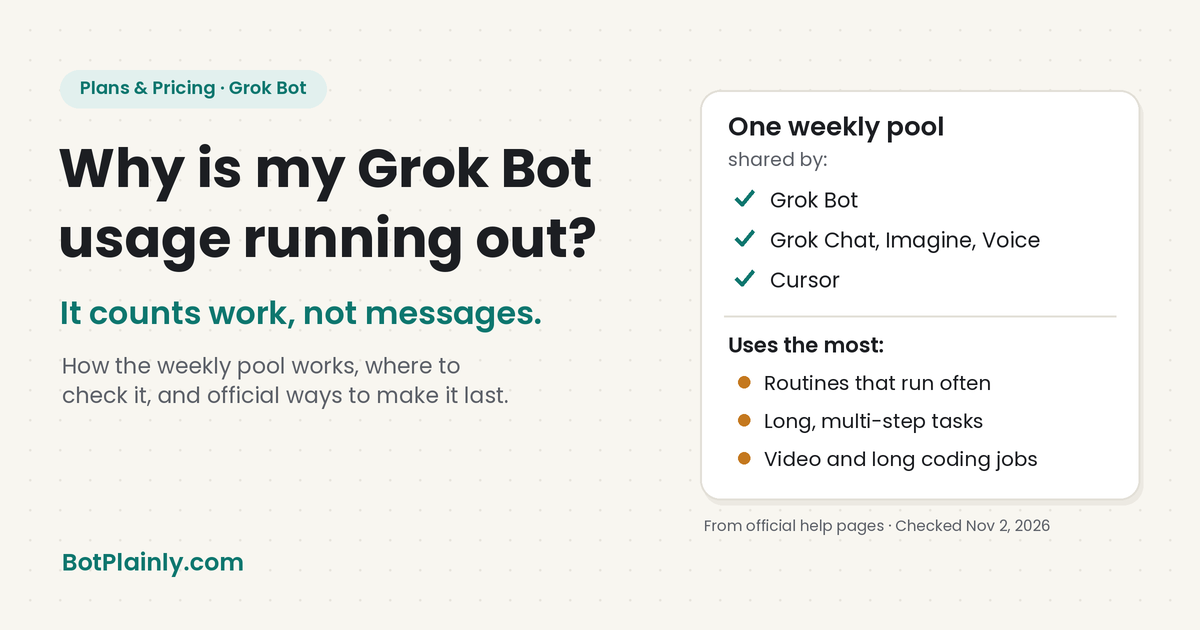
Grok Bot doesn’t count your messages. It counts the work your Bots do, so one long job or one busy routine can eat days of your weekly usage.
Short answer: On The X Subscription, Grok Bot draws from one weekly usage pool that it shares with the Grok apps and Cursor. Official help pages say usage depends on “the kind of work you give Grok Bot and how much effort each task takes,” and that frequent routines are the most common way to burn through it. The official pages don’t publish how much usage each plan gets, only that bigger plans get bigger pools. You can check your meter in Grok Bot under Settings → Usage & Billing.
Last checked: November 2, 2026, on the official pages listed at the end.
Why many people are asking this right now
Around October 31 to November 2, 2026, a lot of Grok Bot users said on X that their usage ran out much faster than usual. Posts on X that mention Grok Bot together with “usage” or “limit” jumped on November 1 and 2, compared with the days before.
On November 1, one user asked Elon Musk on X for a Grok Bot reset, saying “Lots of people say their usage ran out really fast this week.” Elon Musk replied: “The cost of serving Grok Bot was unsustainably high relative to revenue.”
Keep three things in mind about that reply:
- It’s a reply on X, not an official policy page. It doesn’t say what changed, by how much, or for how long.
- The official pages hadn’t changed when we checked. On November 2, 2026, the prices on x.ai/pricing were the same as earlier that day ($8 Plus, $30 Premium, $100 Super, $200 Ultra), the usage limits help page was the same, and the newest Grok Bot changelog entry was still version 0.78.1 from October 27, 2026, with no note about usage rates.
- Nothing here is guaranteed. We don’t know if usage will go back to how it felt before, stay the same, or change again. Watch the official pricing page and changelog for real changes.
What’s below is only what the official pages say, plus tips that come straight from them.
How Grok Bot usage works (from the official pages)
- One weekly pool per paid seat. SpaceXSI’s usage limits page says each paid seat gets “a weekly pool for eligible first-party usage only across supported Grok and Cursor surfaces.” Grok Bot doesn’t have its own meter. Cursor’s help page says Grok Bot “draws from the same weekly pool as Cursor and the Grok apps, not a separate Grok Bot meter.”
- Everything you do in Grok counts too. The pricing page says: “Within Grok, the pool covers Chat, Imagine, Voice, and Bot.” So a weekend of making videos in Grok Imagine leaves less for your Bots.
- Different work costs different amounts. The usage limits page says “Usage rates vary by product, so different activities can draw different amounts from the pool.” Grok’s FAQ puts it simply: “A chat message uses little compute; generating a high-quality video or running a long coding task uses far more.”
- Grok Bot counts steps and tokens, not messages. Cursor’s help page describes the Grok Bot trial credit as “measured by agent steps and tokens rather than the number of messages you send.” In plain words, a Bot that opens ten websites, reads long pages, and writes a big report uses far more than a quick question.
- The model doesn’t change your price. Grok Bot picks the model for each task, and you can’t choose it. Cursor’s help says routing a task to a particular model “doesn’t change what it costs you per token.”
- Bigger plans, bigger pools, but no numbers. The pricing page lists Premium at “4x,” Super at “15x,” and Ultra at “50x” more usage than Plus. It doesn’t say how many tasks or hours that means. If you see an exact number online, it didn’t come from the official pages we checked.
- It refreshes weekly. The pricing page says your allowance “refreshes weekly, so one heavy day never wipes out your whole month.”
Want the plan-by-plan prices? See our Grok Bot pricing guide. Not paying yet? Our Is Grok Free? guide explains what the free plan includes (Grok Bot isn’t on it).
Where to check your usage
- In Grok Bot: open Settings → Usage & Billing. Cursor’s docs say it “shows weekly included usage and on-demand usage for eligible accounts, and the account menu can show weekly usage at a glance.” The changelog adds that it shows when your usage resets, and that the chat warns you when you’re near your weekly limit.
- On the web (The X Subscription): go to grok.com/dashboard and open Usage.
- In the Grok app or grok.com: Settings → Usage shows a progress bar, a breakdown by product, and your weekly reset date and time, according to Grok’s FAQ.
Grok and Grok Bot can show different meters. Cursor’s help says “A paywall or a Weekly SuperGrok Limit in the Grok app is not about Grok Bot,” and that Grok Bot usage “lives on your Cursor account.” So check the Grok Bot screen for Grok Bot.
The biggest usage drain: routines
If your usage drops fast, the official routines help page says to look here first: “Start with how often your routines run. Each run spends usage, so a routine that runs often spends more than one that runs rarely.”
It also gives a warning worth remembering: “An hourly schedule, a short interval, or a Slack trigger on a busy channel can use a week of usage in a day.”
This includes routines that keep a Page up to date, like a dashboard that refreshes every hour. Every refresh is a run.
Ways to make your usage last
Every tip here comes from the official help pages.

- Pause routines you don’t need. “A routine that never runs doesn’t spend usage.” The help page says to pause what you don’t need “before you raise a plan or an on-demand limit.”
- Run routines less often. Ask your Bot to “widen schedules.” A daily or weekly digest is usually enough instead of an hourly one.
- Narrow your triggers. For Slack triggers, the help says “Keep the channel and phrase narrow,” because a trigger on any message in a busy channel “spends usage on messages that don’t need the Bot.”
- Go easy on Test. A routine’s Test button runs the whole job, and the help page says it spends usage “because it performs the work.”
- Start small and scope tasks tightly. Cursor’s advice: “Start small and scope tasks tightly, then scale up once you see how much each task uses.” Give your Bot one clear job instead of “research everything about this.”
- Check your meter before a big job. The official advice is to “check your usage on the plan screen before running large or long jobs.”
- Remember Grok and Cursor share the pool. Video in Grok Imagine and long coding tasks in Cursor come out of the same weekly pool as your Bots.
For more on how Grok, Cursor, and Grok Bot share one pool, see what Cursor is and how it works with Grok Bot.
What happens when you run out
- On The X Subscription: when your weekly pool runs out, you can wait for the weekly reset, buy prepaid credit (top-ups), or move to a bigger plan. Cursor’s FAQ says: “Your weekly usage is used up. It resets each week.” Top-ups and Auto Top-up live under Additional usage credits at grok.com/dashboard/billing.
- Auto Top-up is off unless you turn it on. SpaceXSI’s docs say it “only runs after you enable it.” You can also set a monthly cap on extra usage.
- A cap isn’t a hard stop mid-task. Cursor’s FAQ says “The cap does not stop a Bot in the middle of a run, so a running task can go a little past it.”
- On older Cursor plans: extra usage is called On-demand usage, and you set its cap under Settings → Usage & Billing → On-demand monthly limit. If on-demand is off, Grok Bot stops when weekly usage runs out and starts again when it resets.
Before you buy credit, make sure you actually want to keep going this week. Prepaid credit you’ve already spent isn’t refundable, according to Cursor’s plans page.
Can I get a usage reset?
There’s no official way to reset everyone’s usage that we found. But there is one official way to earn a reset: the Grok Bot referral program. Cursor’s help says that when a friend signs up through your link, “A usage reset is recorded on your account 7 days after your friend’s first payment.” It’s rolling out gradually, you need a paid individual Premium, Super, or Ultra plan bought on the web and billed in the US, and using the resets is “switching on gradually” too.
Is it worth upgrading?
Only if you’ve already tried the tips above. The pricing page’s advice is “Premium for new AI users, Super for daily agent users, and Ultra for power users.” The routines help page says to cut back on routines before you raise a plan or a spending limit. Watch your meter for a week after you trim things, then decide.
Frequently asked questions
Why does my Grok Bot usage run out so fast?
Grok Bot usage depends on how much work your Bots do, not how many messages you send. Long tasks and frequent routines use the most. It also shares one weekly pool with Grok Chat, Imagine, Voice, and Cursor. Many users also reported faster drain around October 31 to November 2, 2026, which the official pages didn’t explain.
Did Grok Bot change its usage limits?
The official pages didn’t say so as of November 2, 2026. Prices, the usage limits page, and the Grok Bot changelog hadn’t changed. Elon Musk replied on X on November 1 that “The cost of serving Grok Bot was unsustainably high relative to revenue,” but that’s a reply on X, not an official policy page.
Where do I see my Grok Bot usage?
In Grok Bot, open Settings → Usage & Billing. On The X Subscription you can also open Usage at grok.com/dashboard. The Grok app’s own usage screen is a separate meter.
When does Grok Bot usage reset?
Every week. Settings → Usage & Billing in Grok Bot shows when your included usage resets.
How can I make my Grok Bot usage last longer?
Pause routines you don’t need, run the rest less often, narrow Slack triggers, keep tasks small and clear, and check your meter before big jobs. These tips come from the official Grok Bot help pages.
Sources (last checked November 2, 2026)
- Weekly pool, top-ups, and where to look: docs.x.ai/x-subscription/usage-limits and Extra usage credits and top-ups
- Grok Bot on The X Subscription and checking usage: docs.x.ai/x-subscription/grok-bot
- Plans, prices, 4x, 15x, and 50x usage, and pricing FAQ: x.ai/pricing and docs.x.ai/x-subscription/pricing
- Shared pool, steps and tokens, on-demand and caps, refunds: cursor.com/help/grok-bot/plans
- Usage limit messages, stopping charges, Grok vs Grok Bot meters: cursor.com/help/grok-bot/faqs
- Routine usage tips: cursor.com/help/grok-bot/routines
- Models and cost per token: cursor.com/help/grok-bot/models
- Usage & Billing screen: cursor.com/docs/grok-bot/settings and the Grok Bot changelog (v0.46.0, v0.63.0, v0.70.2; latest v0.78.1, Oct 27, 2026)
- Grok app usage screen and compute: Grok Website / Apps FAQ
- Referral usage resets: cursor.com/help/account-and-billing/referral-program
- Elon Musk’s reply (not an official policy page): x.com/elonmusk/status/2116992258520064397, posted November 1, 2026
BotPlainly is independent and not affiliated with, endorsed by, or sponsored by SpaceXSI (formerly xAI), X, or Cursor. Grok, Grok Bot, and X are trademarks of their owners. There are no affiliate links in this post, and we don’t earn anything from these plans. Usage rules and prices change often, so always confirm on the official site.